For many families, the hardest part of screen time is not the screen itself. It is the repeated negotiation around it: “Five more minutes.” “I’m nearly finished.” “Everyone else is allowed.” “Why do I have to stop?”
Those arguments can make parents feel as if the only choices are giving in or becoming stricter. A more useful goal is to help children gradually develop self-management: knowing when screens are useful, when they are becoming distracting, and how to stop without every transition becoming a conflict.
Current guidance from the American Academy of Pediatrics (AAP) increasingly focuses on the quality, context and effects of digital media rather than treating every minute of screen use as identical. For school-age children and teenagers, there is no single daily number that fits every family. What matters is whether media use is appropriate for the child and whether it crowds out sleep, physical activity, learning, family relationships and other important parts of life.
Start with the right goal: balance, not zero screens
Children use screens for homework, communication, games, creativity, videos, reading and learning. Trying to eliminate digital media completely is neither realistic nor necessary for most families.
A healthier question is:
“Is this screen use fitting into a balanced life?”
A child who uses a device for school, talks with friends online, plays a game for a while and still sleeps well, stays active, completes responsibilities and participates in family life is in a different situation from a child whose digital use repeatedly disrupts those areas.
This distinction is important because it shifts the conversation from “screens are bad” to “how do we use them well?”
Use the five questions behind healthier media habits
The AAP’s “5 Cs” approach encourages families to think about the child, the content, whether media is being used mainly to calm emotions, what it may be crowding out, and how the family communicates about digital life.
You can translate that into five practical questions:
- Child: How does this particular child respond to screens? Do transitions tend to be easy or difficult?
- Content: What are they actually watching, playing or creating?
- Calm: Is a device becoming the only way they know how to deal with boredom, frustration or distress?
- Crowding out: Is screen use replacing sleep, movement, homework, friendships, reading or family time?
- Communication: Can the child talk openly with a parent about what happens online?
These questions are often more informative than simply counting hours.
1. Create predictable routines before arguments begin
Rules are easier to follow when they are predictable. If a child never knows when gaming will be allowed or when it will suddenly be stopped, every transition can feel like a new negotiation.
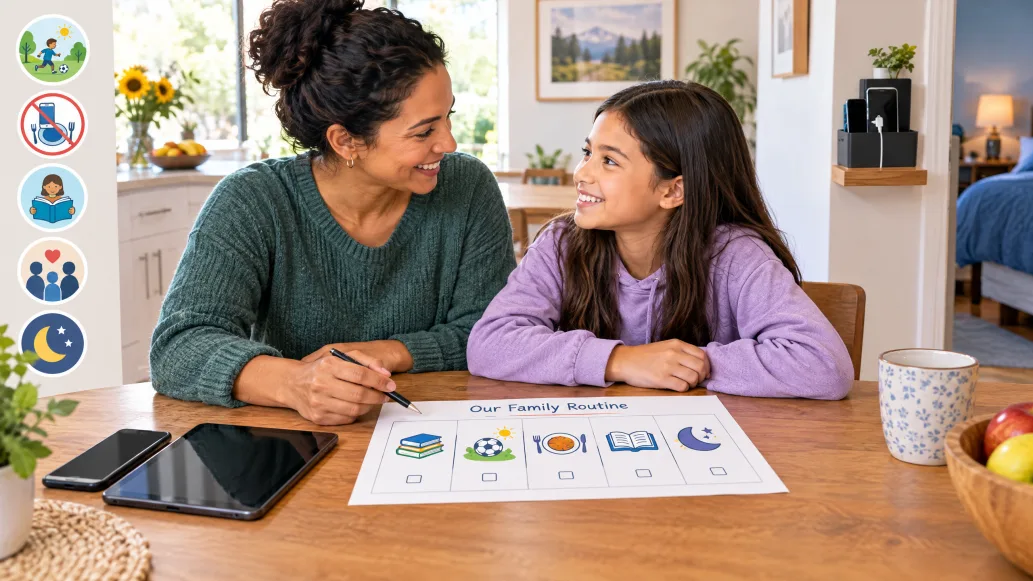
A family routine might look like this:
- arrive home and have a snack;
- complete essential homework or responsibilities;
- have some movement, outdoor time or another activity;
- use entertainment screens during an agreed window;
- stop screens before the bedtime routine begins.
The exact order will vary between households. Consistency matters more than copying someone else’s timetable.
When children know what happens next, parents need fewer repeated instructions and children can begin anticipating the transition themselves.
2. Agree on rules when nobody is upset
Trying to design a screen policy while a child is already refusing to switch off a game is unlikely to go well.
Discuss the main rules at a neutral time. Keep them short enough to remember. For example:
- schoolwork and essential responsibilities come first;
- phones stay away during meals;
- entertainment screens stop before bedtime;
- downloads and purchases need permission;
- personal information is not shared casually;
- if something online feels frightening, confusing or unsafe, the child can tell a trusted adult without immediately losing all device access.
Older children can help shape the plan. Involving them does not mean they decide every rule; it means they understand the reasons and have some age-appropriate voice in how the plan works.
3. Give warnings before screen time ends
Many screen arguments happen during abrupt transitions. A child may be halfway through a game, video or conversation when a parent suddenly says, “Turn it off now.”
Where practical, use advance warnings:
- “Ten minutes left.”
- “Five minutes left. Finish this round.”
- “It is time to save and stop.”
For older children, use a visible clock, device timer or agreed stopping time so that the parent is not always acting as the human alarm.
The long-term goal is for the child to notice the time and stop independently.
4. Protect sleep as a non-negotiable health priority
Sleep is one of the clearest areas where digital routines can affect wellbeing. The AAP recommends keeping devices out of bedrooms when possible and creating screen-free time before bed. Its current family guidance specifically recommends avoiding screens during the hour before bedtime.
Useful household strategies include:
- charging phones and tablets outside bedrooms;
- using “do not disturb” settings overnight;
- ending gaming and social media before the bedtime routine starts;
- replacing late-night scrolling with reading, quiet music or another calming routine.
This rule is easier to defend when it is framed as protecting sleep rather than “punishing” the child by taking a phone away.
5. Create screen-free places and moments
Not every part of the day needs a device.
The AAP recommends family screen-free periods and spaces so that media does not crowd out conversation, homework, movement and sleep. Common examples include:
- the dinner table;
- bedrooms at night;
- homework time when a device is not required;
- family conversations;
- certain outings or activities.
A simple rule such as “phones do not come to the table” can work better than a complicated collection of exceptions.
6. Turn off features designed to keep children watching
Some digital products make stopping harder by design. Autoplay, endless scrolling, frequent notifications, streaks and rapid rewards can encourage people to continue longer than they intended.
The AAP’s updated Family Media Plan suggests practical changes such as turning off autoplay and unnecessary notifications and using one screen at a time.
That means parents can change the environment instead of relying entirely on willpower.
Useful settings include:
- disabling autoplay;
- muting non-essential notifications;
- setting app or device limits where appropriate;
- removing distracting apps from the home screen;
- keeping the television off when nobody is intentionally watching;
- using parental controls for downloads, contacts and purchases.
7. Judge content as well as time
One hour spent video-calling a grandparent, drawing digitally or learning a skill is not identical to one hour of highly repetitive short-form content.
Ask:
- Is the content age-appropriate?
- Does it support creativity, learning, connection or play?
- Is it frightening, violent, manipulative or dominated by advertising?
- Does it leave the child energised and engaged, or irritable and unable to stop?
- Does it encourage endless use through rewards and distractions?
For younger children especially, co-viewing and co-playing can help parents understand what the child is experiencing and turn media into an opportunity for conversation and learning.
8. Do not let screens become the only way to calm down
Screens can sometimes be useful for distraction — on a long journey, during a difficult medical procedure or when a family genuinely needs a short pause.
The problem is when a device becomes the child’s only strategy for coping with boredom, sadness, frustration or waiting.
Children also need opportunities to practise other forms of regulation, such as:
- talking to someone;
- drawing;
- listening to music;
- moving their body;
- going outdoors;
- reading;
- building or making something;
- breathing slowly;
- having quiet time;
- simply tolerating short periods of boredom.
These alternatives do not need to be forced every time. The aim is to expand the child’s coping toolbox.
9. Replace, do not simply remove
A rule that says only “less screen time” leaves an empty space in the day. Children are more likely to adapt when there is something else available.
Keep realistic alternatives within reach:
- books or comics;
- drawing materials;
- construction toys;
- puzzles;
- sports equipment;
- music;
- simple household projects;
- outdoor play;
- board or card games;
- time with friends or relatives.
The alternative does not need to be highly organised or educational every time. Free play and boredom have value too.
10. Model the habits you want children to learn
Children notice when adults tell them to put phones away while continuing to scroll themselves.
Parents do not need perfect digital habits, but family rules are easier to accept when adults participate. If the rule is “no phones during dinner”, adults should follow it too whenever reasonably possible.
Parents can also narrate healthy decisions:
“I keep checking my phone, so I’m putting it in the other room while we eat.”
That shows children that self-control is a skill adults practise as well.
11. Make online safety part of normal conversation
Digital parenting should not consist only of restriction. Children also need guidance about what happens on screens.
Talk regularly about:
- advertising and influencer marketing;
- misinformation;
- edited or unrealistic images;
- privacy;
- location sharing;
- online bullying;
- strangers and unwanted contact;
- passwords;
- in-app purchases;
- what should and should not be shared publicly.
Short, frequent conversations are often more useful than one dramatic “internet safety talk”.
Children should know that telling a parent about a disturbing message, mistake or uncomfortable experience will lead first to help and problem-solving — not automatically to losing all access to technology.
12. Adjust the rules as children grow
A six-year-old and a sixteen-year-old should not have identical digital rules.
Younger children generally need more direct supervision, tighter boundaries and more help choosing content. As children mature, parents can gradually increase freedom while keeping clear expectations around sleep, privacy, safety, responsibilities and respectful behaviour.
More independence can be linked to demonstrated responsibility:
- stopping when agreed;
- protecting sleep;
- completing responsibilities;
- using privacy settings sensibly;
- asking for help when something goes wrong;
- balancing online and offline activities.
What to do when a screen argument starts anyway
Even good routines will not eliminate every disagreement. Children sometimes protest limits, especially when they are tired, disappointed or absorbed in an activity.
When an argument begins, avoid turning the moment into a long lecture. Restate the agreed rule briefly:
“I know you want to continue. The time we agreed on is finished. You can save your game now, and we can talk about the rule later if you think it needs changing.”
The key is separating two issues:
- the child’s feelings are real and can be acknowledged;
- the boundary can still remain in place.
Once everyone is calm, review what made the transition difficult. Was the warning too short? Was the stopping point unrealistic? Is the schedule inconsistent? Is the child repeatedly unable to stop one particular app or game?
Solving the pattern is more useful than repeatedly winning the same argument.
A practical family screen agreement
A short family agreement might say:
- We use screens for learning, creativity, communication and entertainment — but they do not replace sleep, movement or important responsibilities.
- We keep meals and important family conversations screen-free.
- Entertainment screens stop before bedtime, and devices charge outside bedrooms where practical.
- We give warnings before screen sessions end and use timers when helpful.
- We ask before making purchases or downloading age-restricted apps.
- We do not share passwords, addresses, private images or real-time location casually.
- We tell a trusted adult if something online feels frightening, unsafe or confusing.
- Adults follow the family’s screen-free rules too.
- As children show responsibility, they earn more independence.
When should parents seek extra help?
Occasional arguments about devices are common. Consider discussing the situation with a paediatrician or qualified mental-health professional when digital media use is persistently associated with serious disruption — for example, repeated loss of sleep, declining school functioning, withdrawal from offline relationships, extreme distress whenever access is interrupted, or when parents suspect an underlying issue such as anxiety, depression or attention difficulties.
The AAP specifically recommends looking beyond the device when problematic media use appears significant, because digital behaviour can sometimes be connected with other developmental, emotional or health concerns.
Common misconceptions
“Good parenting means enforcing one perfect screen-time number.”
For older children and adolescents, current AAP guidance emphasises context, content, balance and developmental needs rather than one universal daily number that applies to every family.
“Educational content can stay on as long as a child wants.”
Useful content can still crowd out sleep, movement, face-to-face interaction or other forms of learning. Quality matters, but balance still matters too.
“If a child gets angry when the screen turns off, the device must be addictive.”
Not necessarily. Difficult transitions can happen for many reasons, including fatigue, inconsistent routines, strong engagement or frustration. Persistent and severe problems deserve closer attention, but one tantrum does not establish a diagnosis.
“The stricter the punishment, the faster screen problems disappear.”
Harsh or unpredictable punishments can sometimes increase secrecy and conflict. Clear, consistent boundaries combined with communication, modelling and predictable routines are generally more useful for teaching long-term self-management.
Key takeaways
- Healthy screen habits are about balance and self-management, not simply eliminating technology.
- For school-age children and teens, consider content, context and what media may be crowding out — especially sleep, movement, learning and relationships.
- Predictable routines and advance warnings reduce unnecessary transition battles.
- Screen-free meals, device-free bedrooms and an hour without screens before bedtime can help protect family connection and sleep.
- Turning off autoplay and unnecessary notifications can reduce the pressure to keep watching or scrolling.
- Children need alternatives for boredom and emotional regulation so that devices are not their only coping strategy.
- Parents' own digital habits strongly influence how credible family rules feel.
- Digital safety works best as an ongoing conversation, not a one-off lecture.
- As children demonstrate responsibility, rules can gradually shift towards greater independence.
Frequently asked questions
How much screen time should a school-age child have?
There is no single number that fits every school-age child. Current AAP guidance recommends looking at the quality and purpose of media use and whether it interferes with sleep, physical activity, schoolwork, relationships and family routines. Families can still set entertainment-media limits that fit their own schedule and child's needs.
Should phones be allowed in bedrooms?
The AAP recommends keeping devices out of bedrooms when possible and avoiding screens during the hour before bedtime. A family charging station outside bedrooms can make this easier.
What if my child refuses to stop gaming?
Use predictable stopping times, advance warnings and a timer. If one game repeatedly causes extreme difficulty stopping, review whether that game, the session length or the time of day needs changing. Discuss the pattern when everyone is calm.
Should I use parental controls?
They can be useful for limits, downloads, purchases, contacts and age-appropriate restrictions, especially for younger children. Controls work best alongside conversation and teaching rather than as a substitute for them.
Is screen time before homework always bad?
Not necessarily. What matters is whether the routine works. Some children benefit from a short decompression period after school; others find it much harder to transition from gaming or videos into homework. Build the routine around the child's actual behaviour.
How can I reduce screen time without causing constant arguments?
Change one or two habits at a time. Start with predictable routines, screen-free meals or bedtime device rules. Explain the reason, give transition warnings, provide alternatives and apply the rule consistently. Sudden total restrictions are usually harder to sustain.
Authoritative references
- American Academy of Pediatrics, Digital Ecosystems, Children, and Adolescents: Policy Statement (2025).
- HealthyChildren.org, How to Make a Family Media Plan (American Academy of Pediatrics).
- American Academy of Pediatrics Center of Excellence on Social Media and Youth Mental Health, How to Use the 5 Cs of Media Use.
- American Academy of Pediatrics, Screen Time Guidelines.